What is Assistant menu in Samsung Galaxy Grand Neo(GT-I9060)?
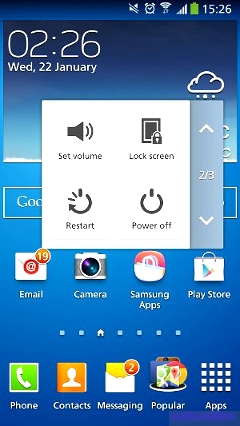
In Samsung Galaxy Grand Neo ( GT-I9060 ) you can move quickly to frequently-visited places and actions using Assistant Menu. It is designed to assist users with reduced dexterity, as well as users who want to navigate the phone using one hand.
Moving Assistant menu icon :
● Assistant Menu always ‘stays on top’ of the Home screen or app.
● To reposition Assistant Menu, tap and drag to another location on screen.
Tap Assistant Menu to display the menu buttons :
● Menu: Open the context-menu.
● Open notifications: Open the Notification Panel.
● Home: Return to the Home screen.
● Back: Return to the previous screen or undo the last action.
● Set volume: Set the system volume.
● Lock screen: Lock the phone.
● Restart: Restart the phone.
● Power off: Turn the phone off.
● Open device options: Open the Device options pop-up menu.
● Capture screen: Take a snapshot of the current screen.
● Zoom: Zoom in or out on the current screen (not all apps support this feature).
● Settings: Configure settings for Assistant Menu.
Three additional options may be added under Settings > Edit :
● Recent apps: View the list of recently used apps.
● Rotate screen: Rotate the current display to Portrait, Landscape with Home key to the left, or Landscape with Home key to the right.
● Set brightness: Adjust the screen brightness.
Tap > Settings for options :
● Tap Dominant hand to optimize the Assistant Menu buttons for use on the left or right side of the screen.
Tap Edit to rearrange or remove icons from Assistant Menu :
● Tap and drag icons to rearrange them.
● Tap to remove an icon from Assistant Menu.
● Tap to add an icon back to Assistant Menu.
NOTE : You can tap Menu > Reset to revert back to the default settings.
Thank you for your feedback!
Please answer all questions.
Contact Info
Digital Service Center
![DSC icon image]()
![DSC icon image]()



Scan to access
WhatsApp
![WhatsApp image icon]()
![WhatsApp image icon]()


Available 24 Hours / 7 days
WhatsApp@ 1-800-5-726-7864

Scan to access
Chat
![Samsung India Support WebChat icon]()
![Samsung India Support WebChat icon]()


Languages offered: English/ हिन्दी/ Indian Regional Languages


Remote Service
![Image of RM icon]()
![Image of RM icon]()


CEO Office
![Image of CEO icon]()
![Image of CEO icon]()


Phone Support (India)
![image of phone dialer]()
![image of phone dialer]()


Phone Support (Bangladesh, Sri Lanka, Nepal)
![Image of caller icon]()
![Image of caller icon]()
RC01_Static Content : This text is only displayed on the editor page